
Gematria: the numeric value of Hebrew words
Every Hebrew letter is also a number: alef is 1, bet is 2, and so on up to tav, which is 400. Gematria adds up those values. The tool shows the values under the Hebrew, adds up phrases and verses, and finds other words with the same total.
Step 1: Open Gematria
Tap Tools ▾ → Gematria. The Gematria panel opens.
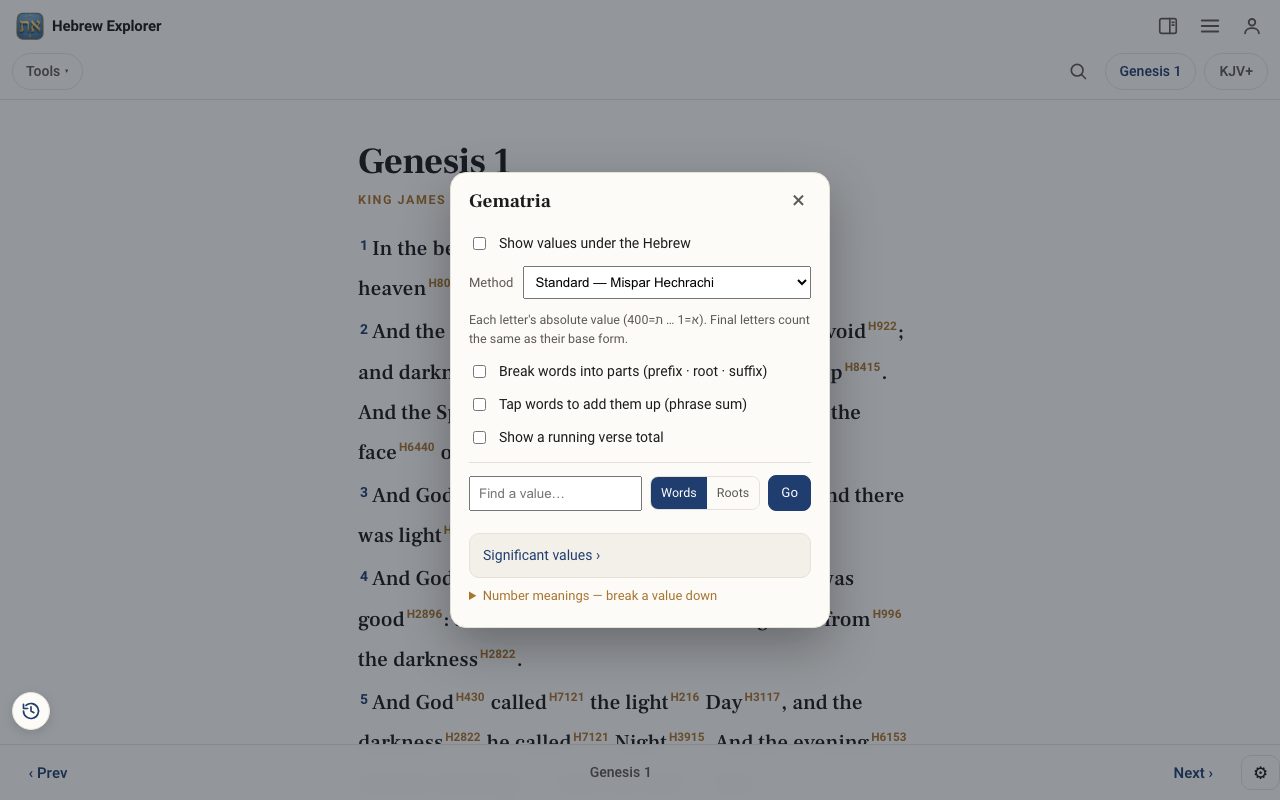
Step 2: Choose a method
The Method list offers Standard (Mispar Hechrachi), Ordinal (Mispar Siduri), Reduced (Mispar Katan), Large (Mispar Gadol) and AtBash. A short note explains each one.
Step 3: Show the values in the text
Tick Show values under the Hebrew. Tick Break words into parts to separate prefix, root and suffix. Tap words to add them up totals a phrase as you tap. Show a running verse total adds up each verse. The values appear under the Hebrew text and in the Interlinear.
Step 4: Look up a value or a word
Type a number in Find a value…, or a Hebrew word, and tap Go to find every word or root with the same total. Significant values › lists well-known numbers.
Step 5: Break a number down
Number meanings explains what a value has been taken to mean. The Numbers tool goes deeper.
Related tutorials
- Numbers: what biblical numbers meanTurn on number highlighting and tap any orange number word for its meaning, Hebrew, Greek and famous examples.Free 3 min · Beginner
- The Hebrew Alef-Bet: meet the 22 lettersEach letter's forms, sound, number, picture, first root in Scripture, and the teaching carried in its shape.Free 5 min · Beginner
- Tap a word: reading the lexiconOpen any Hebrew or Greek word to see its meaning, pronunciation, gematria, every place it appears, and the classic lexicons.Free 6 min · Beginner