
Hebrew Names: the meaning inside every name
In the Bible, names carry meaning: Abram becomes Abraham, Jacob becomes Israel. With Hebrew Names turned on, every name in the chapter glows. Tap one and the name opens up into the Hebrew words it was built from.
Open Hebrew Names in a new tab →
Step 1: Turn on Hebrew Names
Tap Tools ▾ → Hebrew Names. Names in the chapter now glow.
Step 2: Tap a glowing name
Tap a name, such as Abram in Genesis 12. You see the name in Hebrew, The name means, and Built from: the words it is made of.
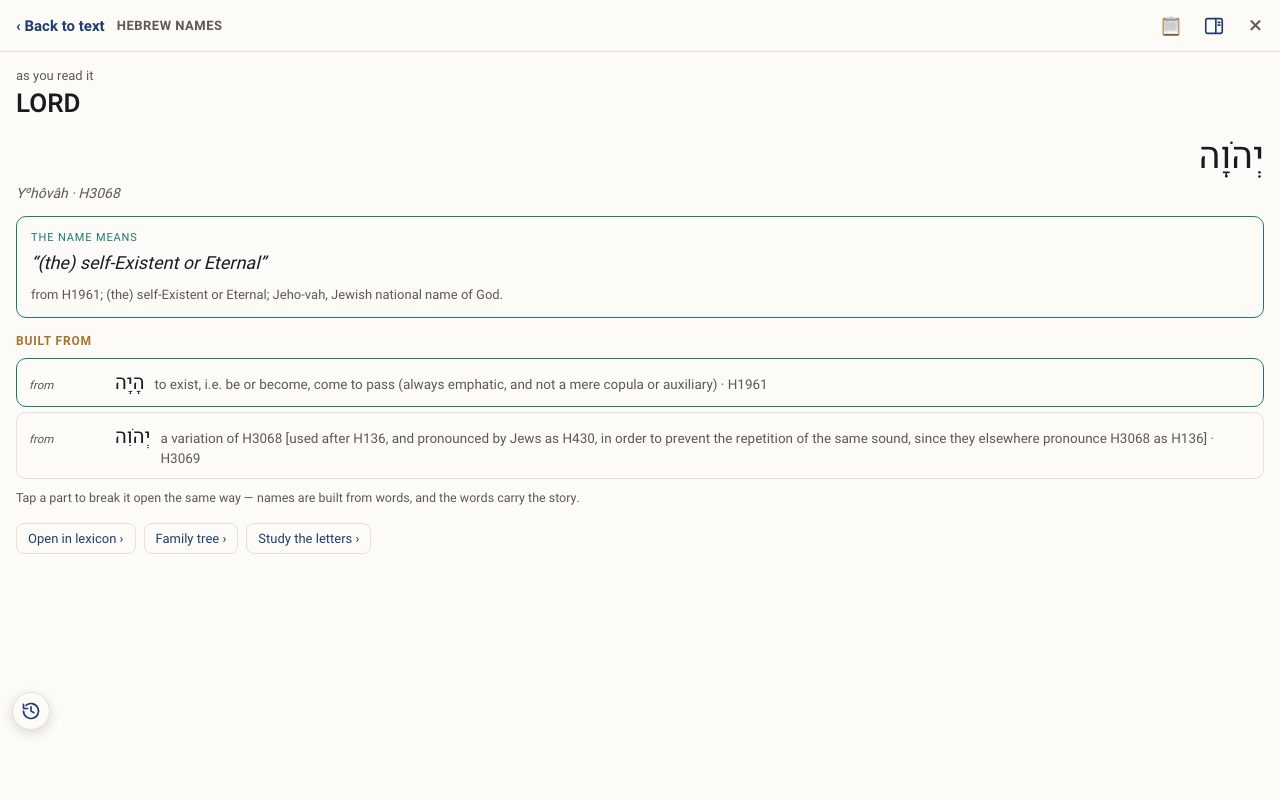
Step 3: Break it open further
Tap a part to break it open the same way. Use Open in lexicon ›, Family tree › or Study the letters › to go deeper.
Related tutorials
- Names of God: every name and title, explainedYHVH, El Shaddai, El Roi and every other name, with Hebrew, Greek, gematria, first mention and meaning.Free 4 min · Beginner
- Bible Heroes: the great lives of ScripturePortraits, Hebrew names and pronunciation, key events and every verse naming each hero.Free 3 min · Beginner
- Places & Geography: every place on the mapEvery place glows green. Tap one to see it on the map, with its meaning and what happened there.Free 4 min · Beginner