
Listen: hear the Bible read aloud
There are two ways to listen. Listen reads the passage on screen aloud, verse by verse. The Audio library holds the whole Bible read aloud, free, along with podcasts, teachings and audiobooks.
Open Listen (read aloud) & Audio library in a new tab →
Step 1: Listen to the chapter
Tap Tools ▾ → Listen (read aloud). A player bar appears and reading starts from the top of the chapter.
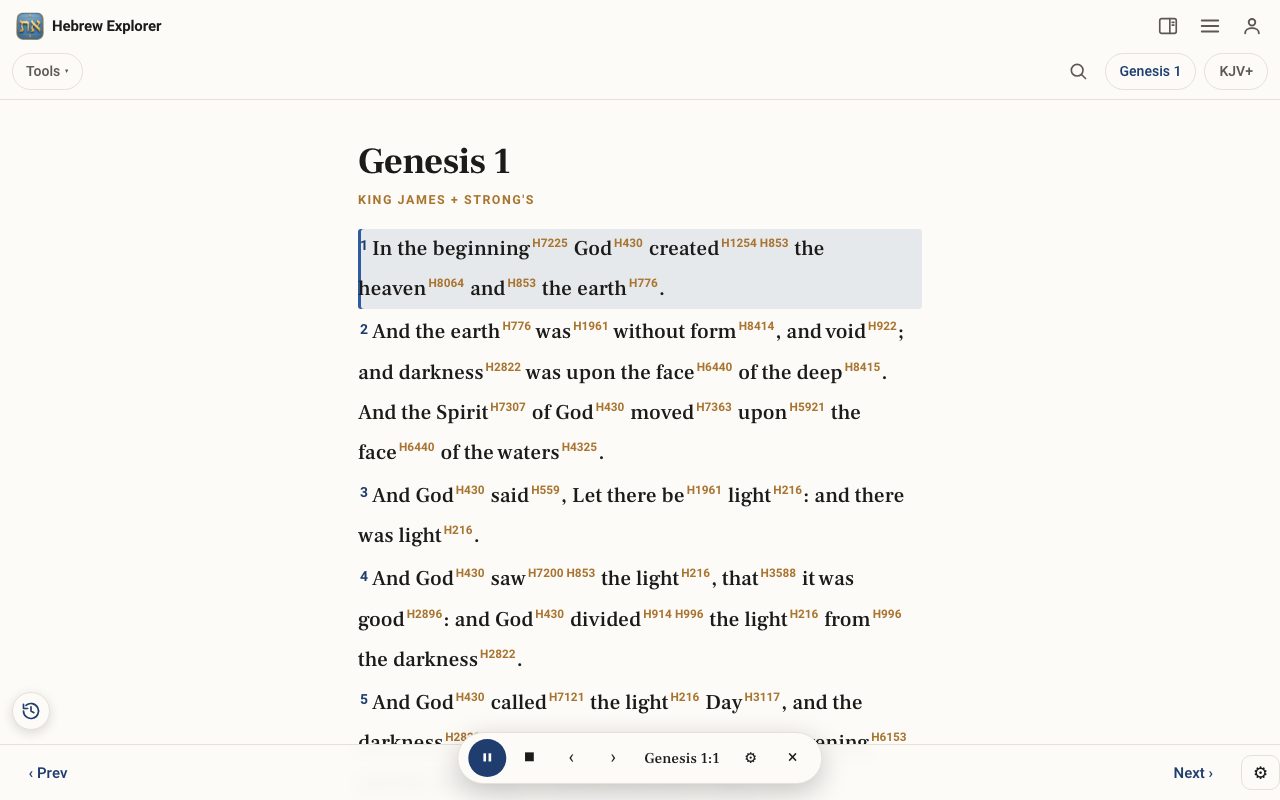
Step 2: Control playback
Use ⏸ to pause, ⏹ to stop, and ‹ › for the previous or next verse. The bar shows which verse is being read. Tap × to close it.
Step 3: Browse the Audio library
Tap Tools ▾ → Audio library for the full Audio Bible (all 1,189 chapters), plus podcasts, teachings and audiobooks.
Related tutorials
- Learn Hebrew Scripture: read any verse aloud in HebrewAny verse laid out word by word, with syllables, stress, meaning and a Hebrew voice, printable as a study sheet.Free samples · Pro 6 min · Beginner
- Tap a word: reading the lexiconOpen any Hebrew or Greek word to see its meaning, pronunciation, gematria, every place it appears, and the classic lexicons.Free 6 min · Beginner