
Recipe: learn to read a verse in Hebrew
You do not need a class to read your first verse in Hebrew. This recipe uses the free tools to take you from the letters to reading Genesis 1:1 aloud, Bereshit bara Elohim…
Open Alef-Bet + Learn Hebrew Scripture + Interlinear in a new tab →
- Meet the letters in the verse
- Hear it slowly
- Read one word at a time
- Check the meaning
- Read it whole, and print it
Step 1: Meet the letters in the verse
Open The Hebrew Alef-Bet and learn the letters that appear in Genesis 1:1: bet, resh, alef, shin, yod, tav, lamed, heh, mem, vav and tsadi.
Step 2: Hear it slowly
Open Learn Hebrew Scripture and tap Genesis 1:1 (free). Play it at 🐌 Very slow while you follow the syllables right to left.
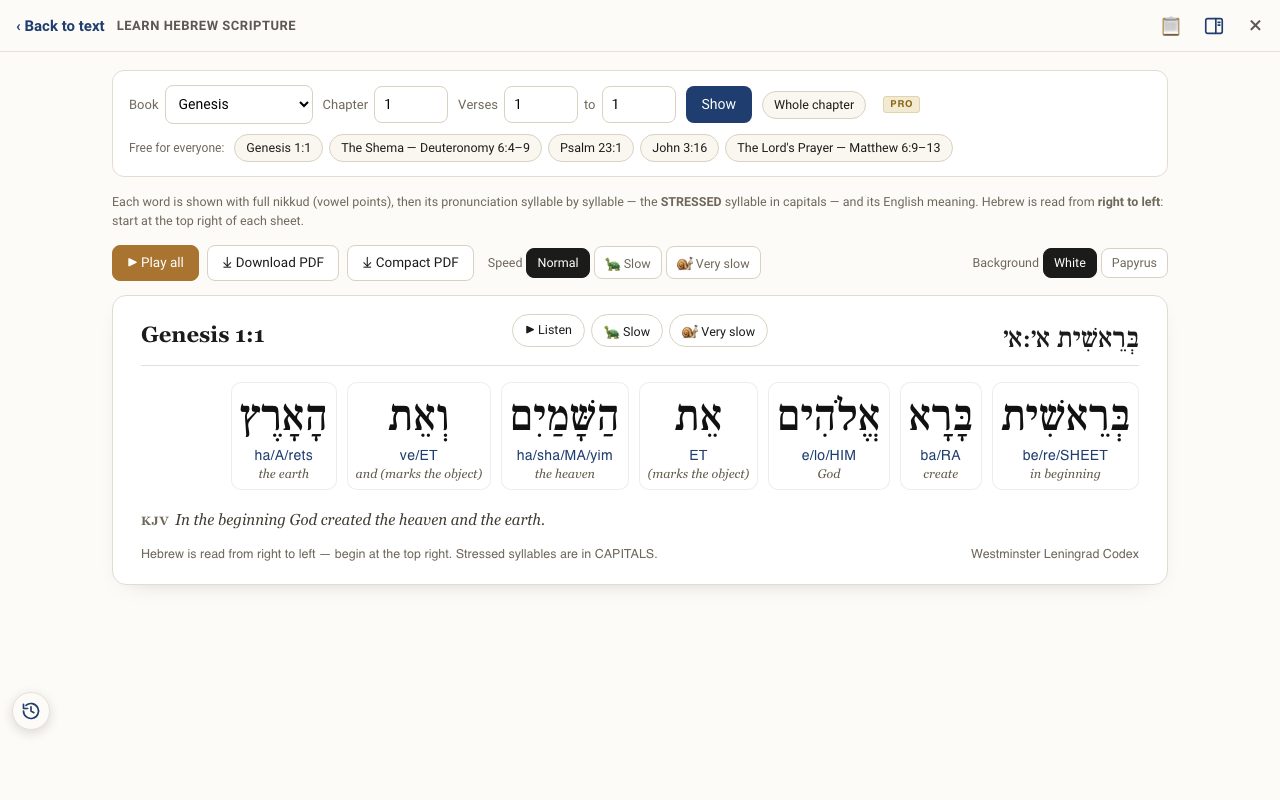
Step 3: Read one word at a time
Tap each word to hear it alone, and say it back. Watch the capitals, which mark the stressed syllable.
Step 4: Check the meaning
Open the Interlinear on Genesis 1 and match each Hebrew word to its English meaning.
Step 5: Read it whole, and print it
Play it at Normal speed and read along. Download the PDF and keep it where you will see it. Then try the Shema, Psalm 23:1, John 3:16 and the Lord's Prayer, which are free too.
Related tutorials
- The Hebrew Alef-Bet: meet the 22 lettersEach letter's forms, sound, number, picture, first root in Scripture, and the teaching carried in its shape.Free 5 min · Beginner
- Learn Hebrew Scripture: read any verse aloud in HebrewAny verse laid out word by word, with syllables, stress, meaning and a Hebrew voice, printable as a study sheet.Free samples · Pro 6 min · Beginner
- The Interlinear: Hebrew and Greek under the EnglishSee every Hebrew or Greek word with its English meaning and Strong's number, verse by verse.Free 4 min · Beginner