
The Interlinear: Hebrew and Greek under the English
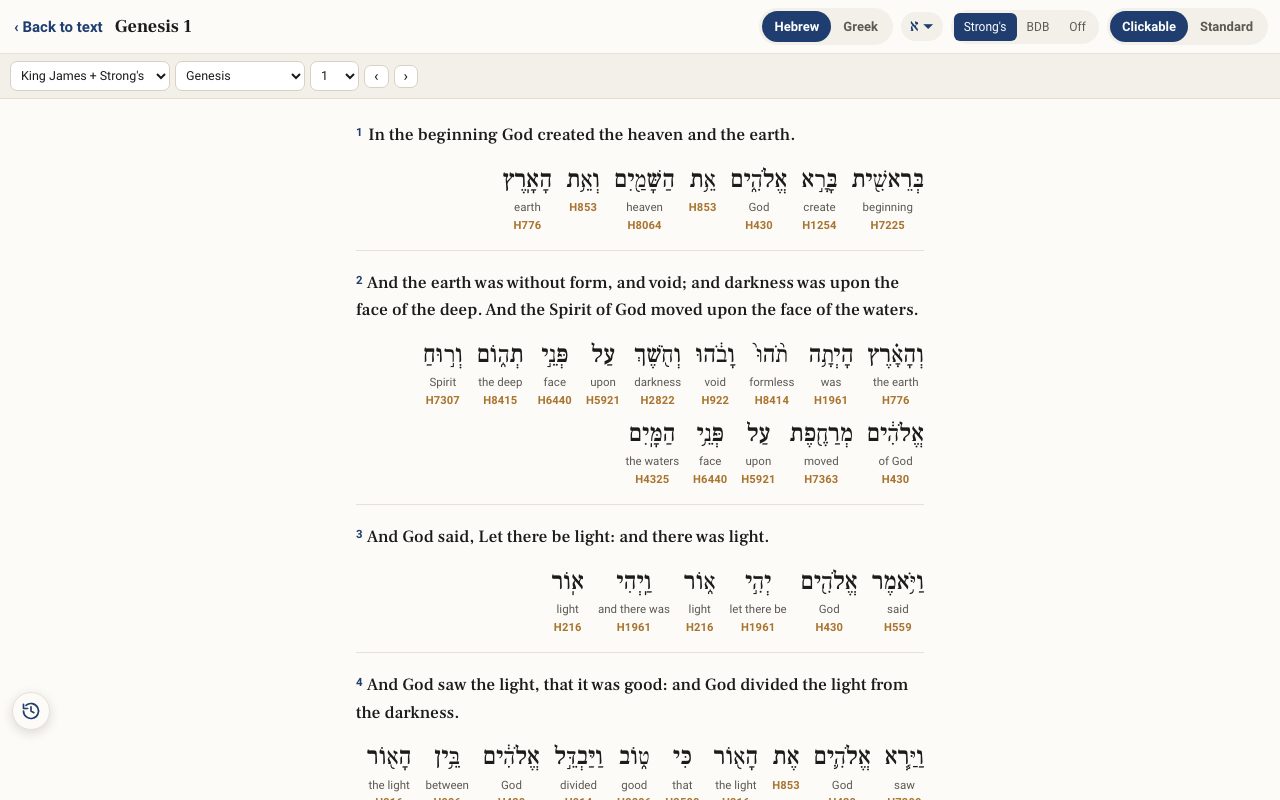
The Interlinear sets the original words under each verse, right to left for Hebrew, with the English meaning and Strong's number beneath each one. It is the best way to see which Hebrew word stands behind which English word.
Open Interlinear in a new tab →
- Open the Interlinear
- Choose Hebrew or Greek
- Choose what shows under each word
- Tap a word to study it
- Move through the Bible
Step 1: Open the Interlinear
Tap Tools ▾ → Interlinear. Each verse appears in English with the Hebrew words beneath it, each word with its meaning and Strong's number.
Step 2: Choose Hebrew or Greek
Use Hebrew or Greek at the top. Greek shows the Greek New Testament, or the Septuagint for Old Testament books.
Step 3: Choose what shows under each word
Strong's shows Strong's short meaning, BDB shows the Brown–Driver–Briggs meaning, and Off hides the meanings so you can test yourself. The א ▾ button changes how the Hebrew letters are displayed.
Step 4: Tap a word to study it
With Clickable on, tap any Hebrew word to open it in the lexicon. Standard is a plain layout for reading.
Step 5: Move through the Bible
Use the translation, book and chapter boxes, or the ‹ › arrows, to move. Tap ‹ Back to text when you are done.
Related tutorials
- Tap a word: reading the lexiconOpen any Hebrew or Greek word to see its meaning, pronunciation, gematria, every place it appears, and the classic lexicons.Free 6 min · Beginner
- Choosing a translation — English, Hebrew, Greek and moreSwitch between English versions, the Hebrew and Greek originals, the Septuagint and Spanish.Free 4 min · Beginner
- Learn Hebrew Scripture: read any verse aloud in HebrewAny verse laid out word by word, with syllables, stress, meaning and a Hebrew voice, printable as a study sheet.Free samples · Pro 6 min · Beginner