
Torah Portion: this week's parashah
Every week the Torah is read in order, one portion (parashah) at a time, together with a reading from the Prophets (Haftarah). Many Messianic believers add a New Testament reading (B'rit Chadashah). This tool shows this week's readings and all 54 portions.
Open Torah Portion in a new tab →
Step 1: Open Torah Portion
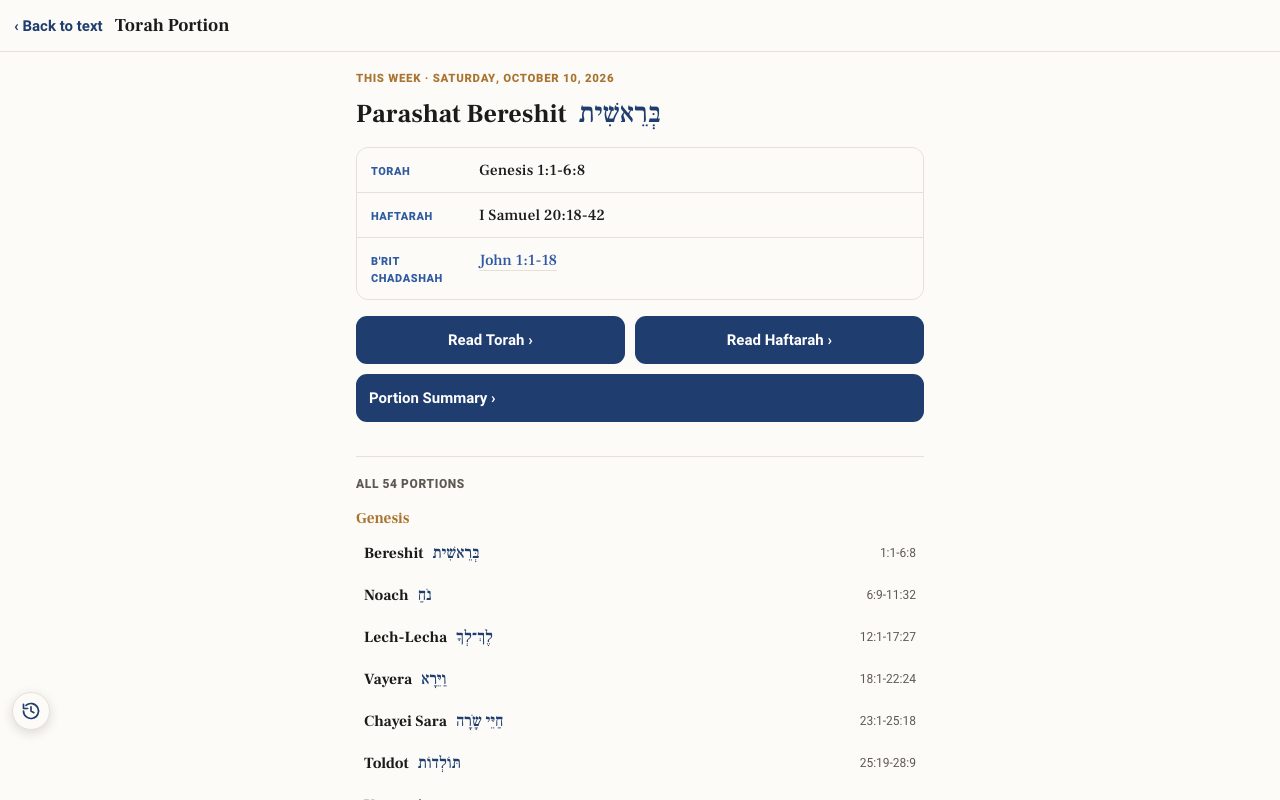
Tap Tools ▾ → Torah Portion. At the top is This week, with the Shabbat date, the portion's name, and its Torah, Haftarah and B'rit Chadashah readings.
Step 2: Read it
Tap Read Torah › or Read Haftarah › to open the passage in the reader.
Step 3: Read the summary
Tap Portion Summary › for a four-tab study of the portion.
Step 4: Browse all 54
Scroll to All 54 portions, grouped by book, and tap any portion.
Related tutorials
- Torah Birth Portion: the portion read the week you were bornEnter a birth date to find the Torah portion and Haftarah read on the Shabbat of that week.Free 2 min · Beginner
- Recipe: prepare a Torah portion lessonPlan a group study of this week's parashah: readings, context, one key word, and a handout.Free 30 min · Intermediate
- The Study Panel: your study space beside the textResources for the chapter, your notes and highlights, saved studies, a parallel translation, books and search, all beside the text.Free 6 min · Beginner